SKU: AT-UHD-SW-510W
Summary: Disabling HDCP on the AT-UHD-SW-510W—
In some cases it may be necessary to disable HDCP on the AT-UHD-SW-510W. This article outlines steps to help.
Introduction
HDCP is a content protection encrypted protocol required for certain copyrighted content.
You may want to disable HDCP on your 510W inputs—
- If you are using a video conference system as a sink device, HDCP may not be supported.
- If you are seeing snow, green screen, or flickering and your sources don't require HDCP.
- Note: The 510W will not strip HDCP.
- The 510W will request that your source not use HDCP.
Changing the HDCP Setting
Please see the following instructions for accessing the 510W Web UI.
|
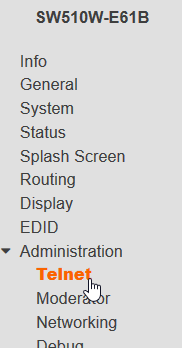
In the Web UI, navigate to Administration -> Telnet |
 |
Disabling HDCP Support for an Input
|
|
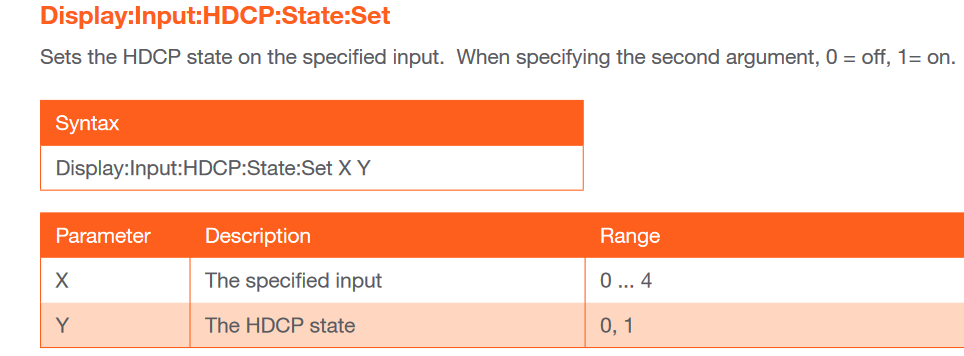
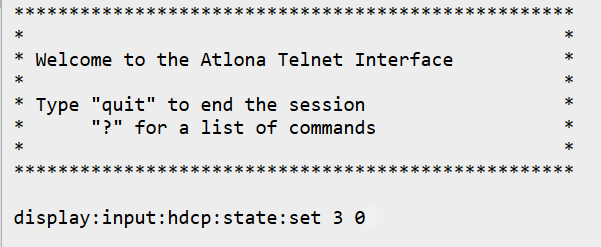
Enter display:input:hdcp:state:set <input> 0
|
|
Please refer to this table for <input> numbers.
|
*BYOD does not support HDCP so you should not have to change the HDCP setting for this input. |
Re-enabling HDCP Support for an Input:
-
Ex:
display:input:hdcp:state:set 3 1
- Set the last parameter to 1
Article ID: KB01670